[Avg. reading time: 18 minutes]
MQTT - Message Queuing Telemetry Transport
MQTT is one of the most widely used messaging protocols in the Internet of Things (IoT).
It was originally developed by IBM in 1999 and later standardized by OASIS. MQTT became popular in IoT because it is simple, lightweight, and designed for unreliable networks.
MQTT works well on:
- Low bandwidth networks
- High latency connections
- Intermittent or unreliable connectivity
Unlike HTTP, MQTT uses a binary message format, making it far more efficient for constrained devices such as sensors and embedded systems.
Why MQTT Exists
Traditional request–response protocols like HTTP are inefficient for IoT devices.
MQTT was designed to:
- Minimize network usage
- Reduce device CPU and memory consumption
- Support asynchronous, event-driven communication
Work reliably even when devices disconnect frequently.
Core MQTT Concepts
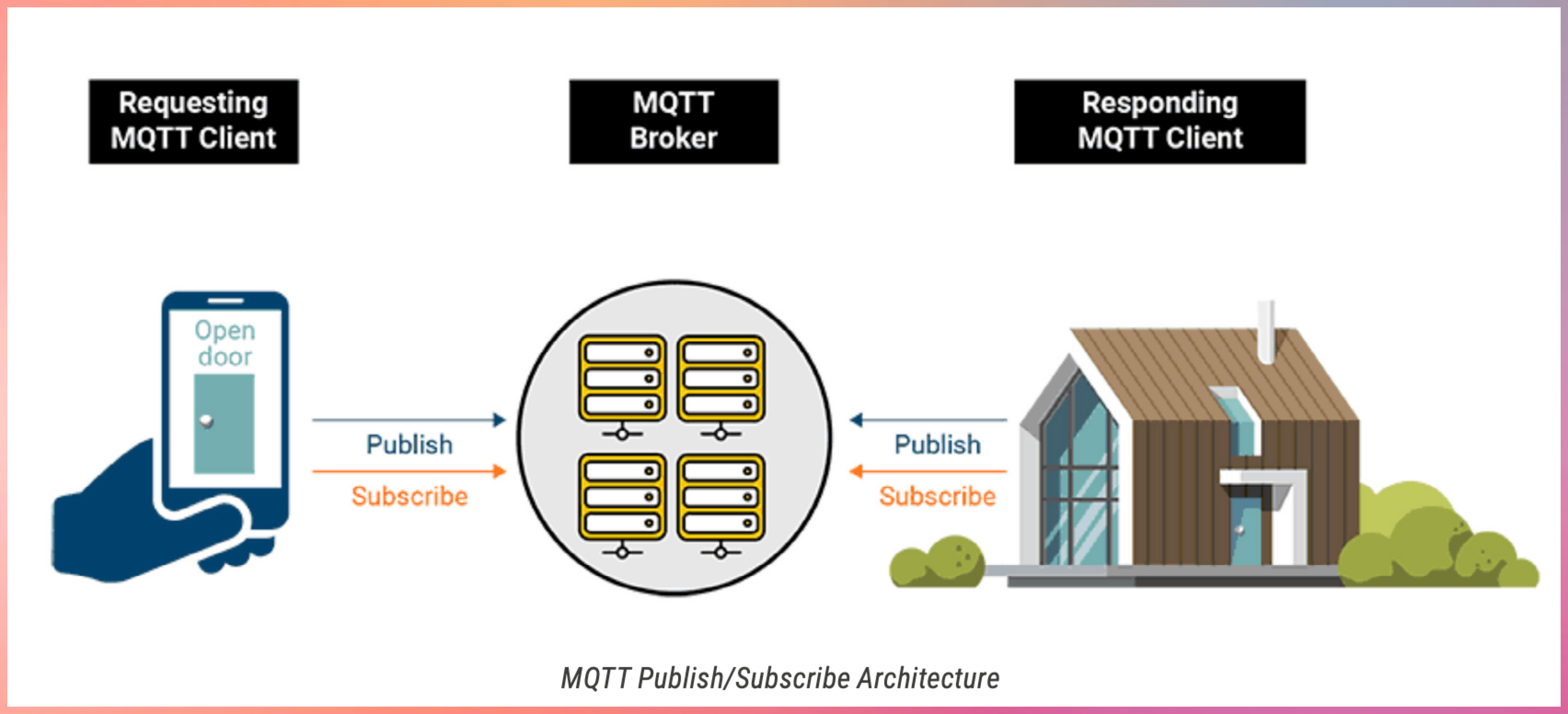
- Publish–Subscribe Model
- MQTT uses a publish–subscribe architecture.
- Devices publish messages to a broker
- Devices subscribe to topics they are interested in
- The broker routes messages to matching subscribers
- Devices never communicate directly with each other.
MQTT Components
MQTT Broker
- The broker is the central message hub.
- Think of it like a post office:
- Receives messages from publishers
- Filters messages by topic
- Delivers messages to subscribers
Common brokers:
- Open source: Mosquitto
- Commercial: HiveMQ
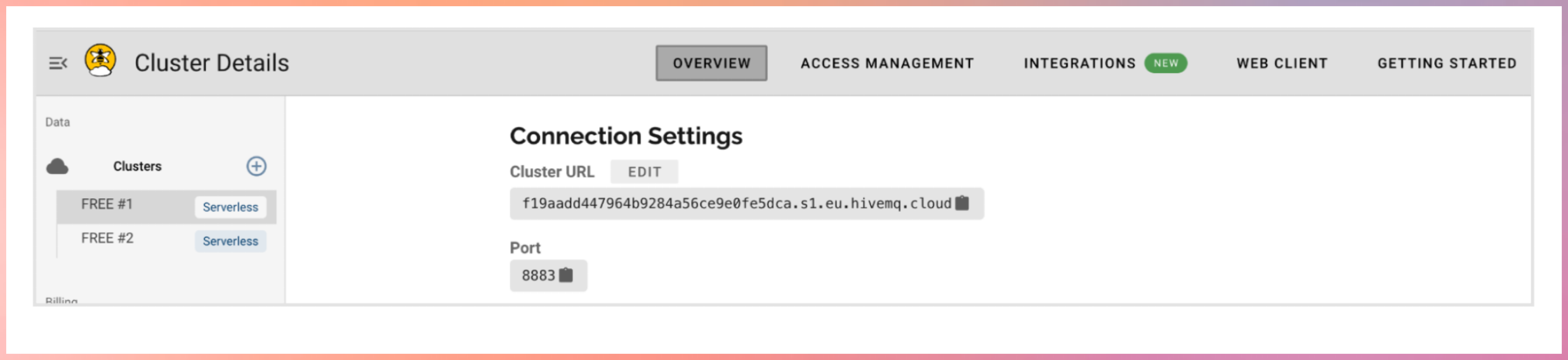
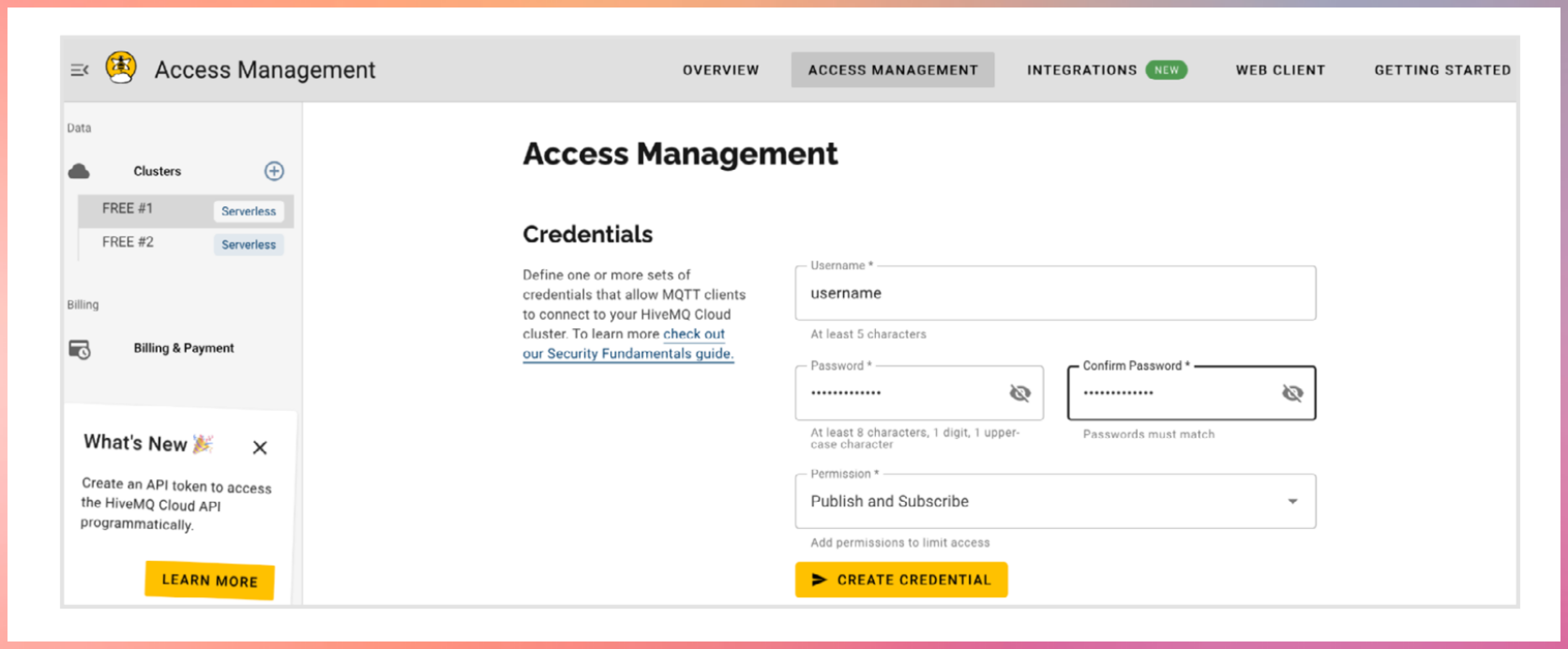
Register with hivemq cloud
Publishers
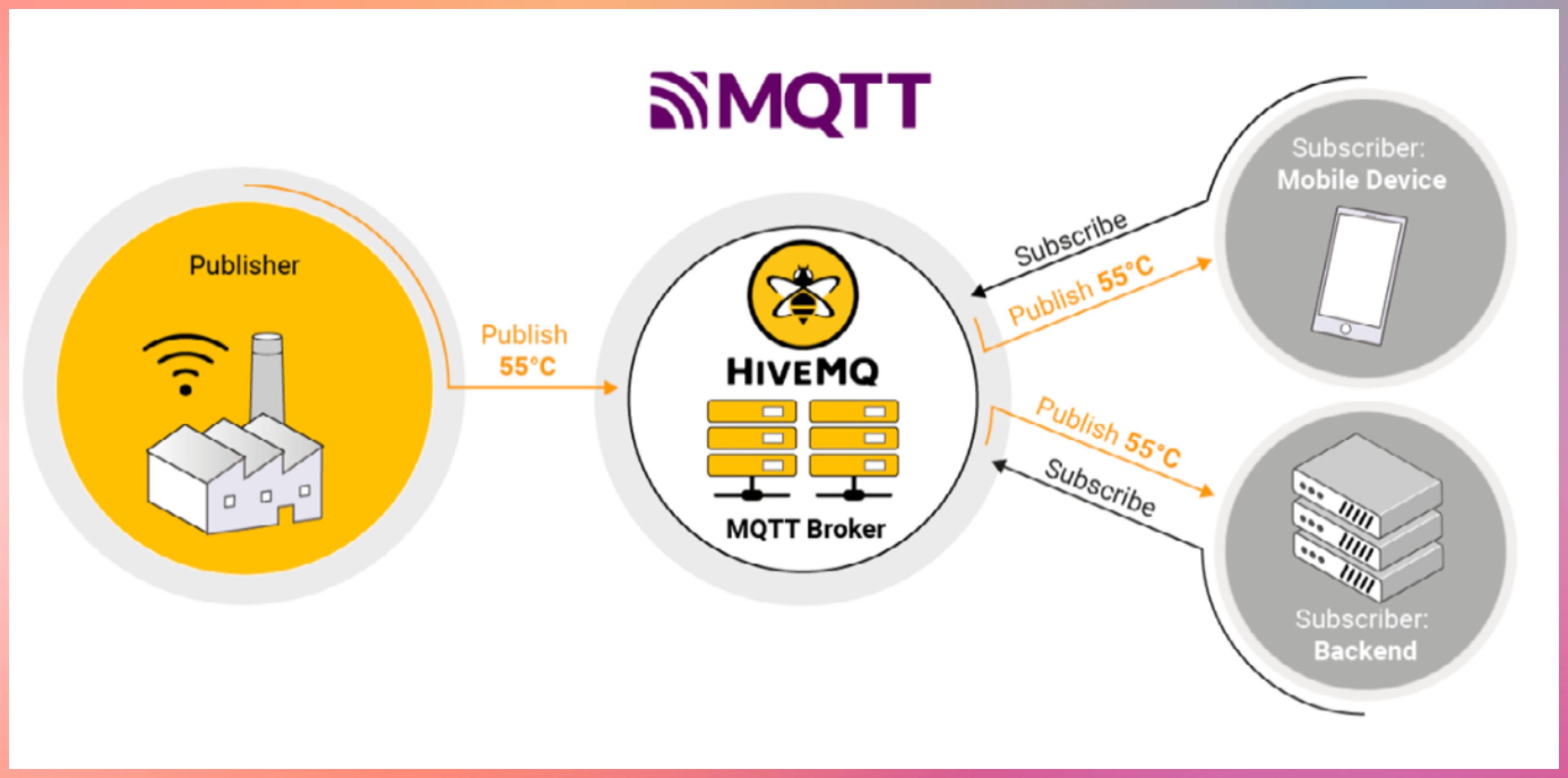
Devices that send data
Example:
- Temperature sensor publishing readings
- Garage door device publishing open or close status
Subscribers
Devices that receive data
Example:
- Mobile app receiving temperature updates
- Backend system monitoring device health
Topics
Topics are hierarchical strings used to route messages.
Example:
home/livingroom/temperature
- Publishers send messages to a topic
- Subscribers subscribe to topics of interest
- The broker matches topics and delivers messages
Topic Wildcards
MQTT supports topic wildcards for flexible subscriptions.
Single-level wildcard
- Matches exactly one level
Example:
home/+/temperature
Multi-level wildcard
Matches all remaining levels
Example:
home/#
Key Features of MQTT
- Lightweight and Efficient
- Small packet size
- Minimal protocol overhead
- Ideal for constrained devices
- Bidirectional Communication
- Devices can both publish and subscribe
- Enables real-time updates and control
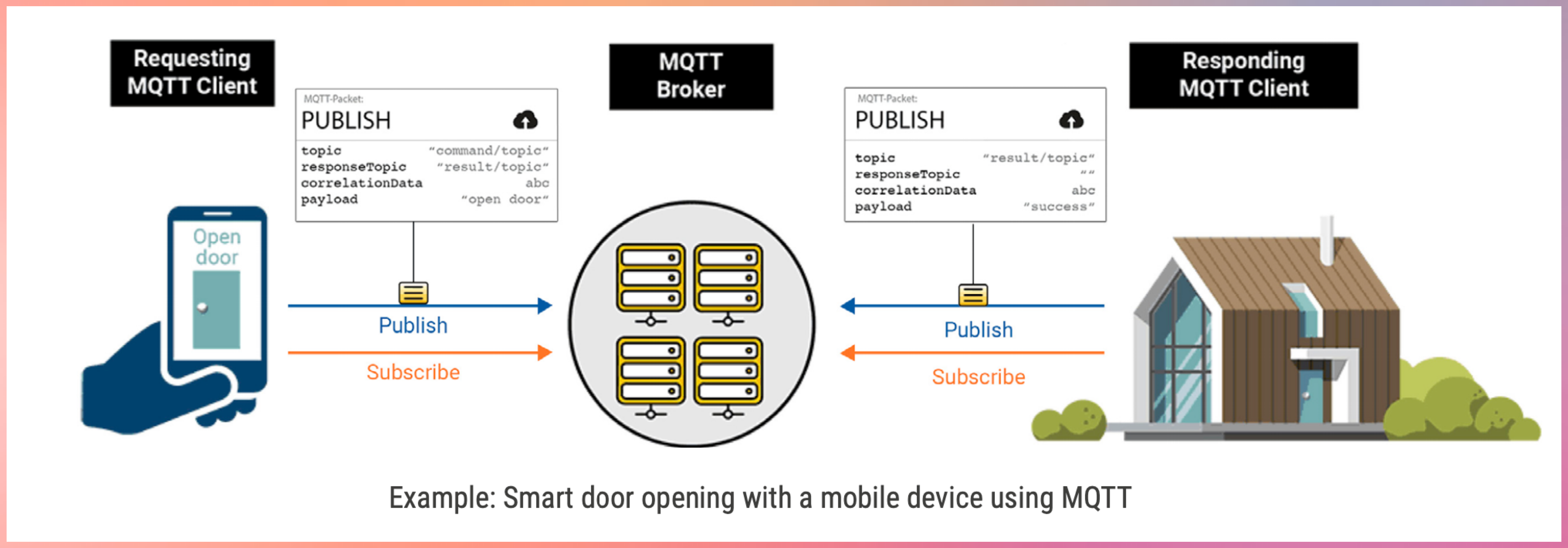
- Highly Scalable
- Supports thousands to millions of devices
- Widely used in large IoT and IIoT deployments
- Configurable Reliability
- Supports different Quality of Service levels
- Lets you trade reliability for performance
- Session Persistence and Buffering
- Brokers can store messages when clients disconnect
- Messages are delivered when clients reconnect
- Security Support
- MQTT itself has no built-in security
- Security is added using:
- TLS encryption
- Client authentication
- Access control at the broker
graph LR
    B[MQTT Broker]
    CD1[Client Device]
    CD2[Client Device]
    CD3[Client Device]
    CD4[Client Device]
    CD5[Client Device]

    CD1 -->|Topic 2| B
    CD1 -->|Topic 1| B
    CD2 -->|Topic 2| B

    B -->|Topic 2| CD3
    B -->|Topic 1
    Topic 3| CD4
    B -->|Topic 3| CD5
Quality of Service (QoS)
MQTT defines three QoS levels for message delivery. QoS is coordinated by the broker.
QoS 0 – At most once
- No acknowledgment
- Messages may be lost
- Lowest latency
- Use when message loss is acceptable
- Example: Temperature sensor every 2 seconds. High volume of data.
QoS 1 – At least once
- Message delivery is acknowledged
- Messages may be duplicated
- Commonly used in IoT
- Use when Message loss is unacceptable and duplicate messages can be handled
- Deduplication handled by message id.
- Example: Smart meter readings. Door open/close.
QoS 2 – Exactly once
- Guarantees single delivery
- Highest overhead
- Increased latency
- Use only when message loss and duplication are both unacceptable.
- Example: control commands, critical alerts, factory machine shutdown.
Higher QoS levels consume more network and compute resources.
Pub QoS 1, Sub QoS 0 → delivered as QoS 0
Pub QoS 2, Sub QoS 1 → delivered as QoS 1
Pub QoS 0, Sub QoS 2 → delivered as QoS 0
Message Persistence
Message persistence ensures messages are not lost when clients disconnect.
Non-persistent (Default)
- Messages are not stored
- Lost if subscriber is offline
- Suitable for non-critical data
Queued Persistent
- Broker stores messages for offline clients
- Messages delivered when client reconnects
Similar to: Emails waiting on a server until you connect
Persistent with Acknowledgment
- Messages stored until acknowledged
- Messages resent until confirmation
Used when: Guaranteed processing is required
Persistent Session Stores
When persistence is enabled, brokers may store:
- Client ID
- Subscription list
- Unacknowledged QoS messages
- Queued messages
CONN Car Company
Vehicles are shifting from hardware to Software Defined Vehicles. (EVs like Tesla)
MQTT is used for:
- Telemetry streaming
- Remote diagnostics
- Over-the-air updates
- Feature enablement
EV companies use MQTT to connect vehicles, cloud systems, and mobile apps reliably.
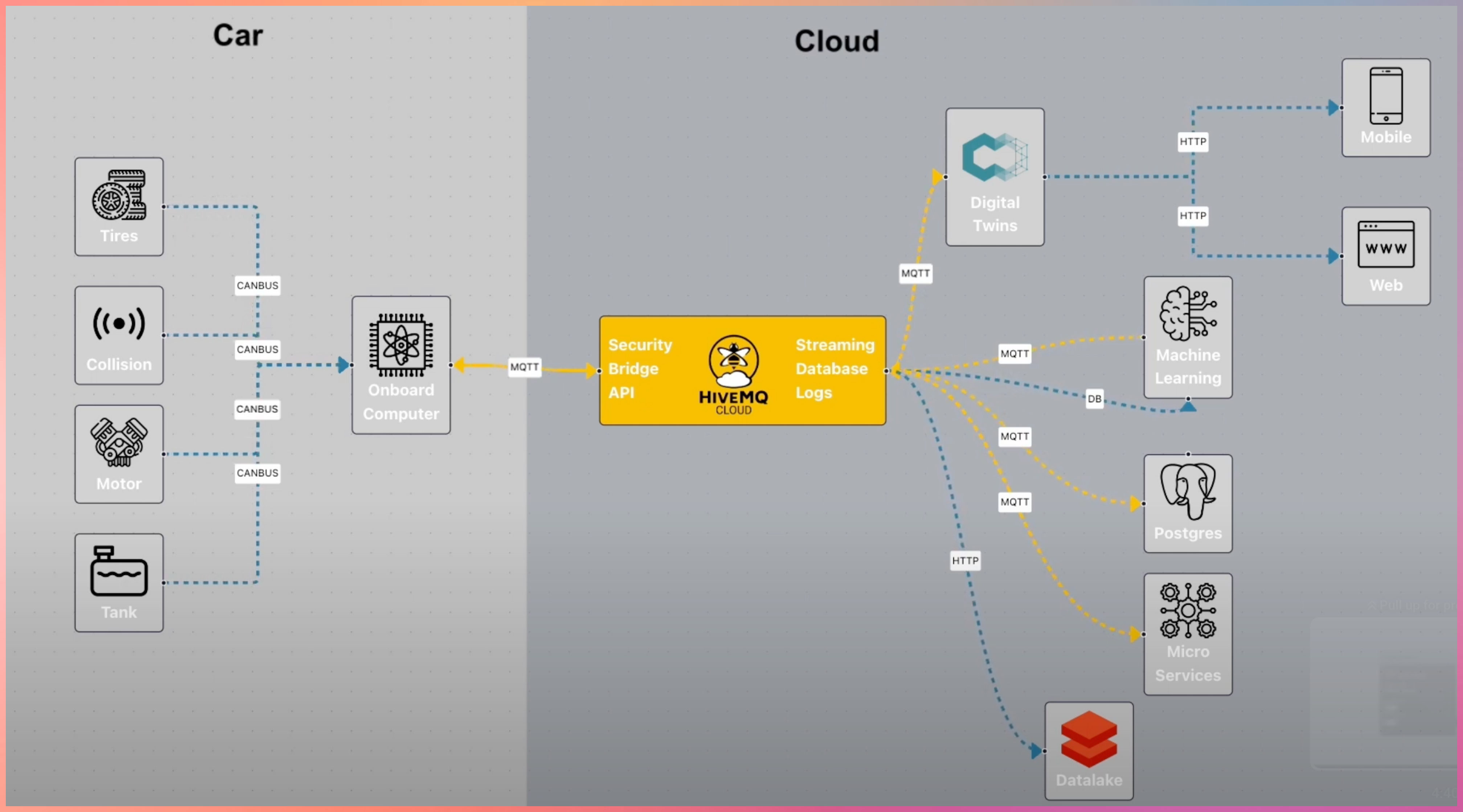
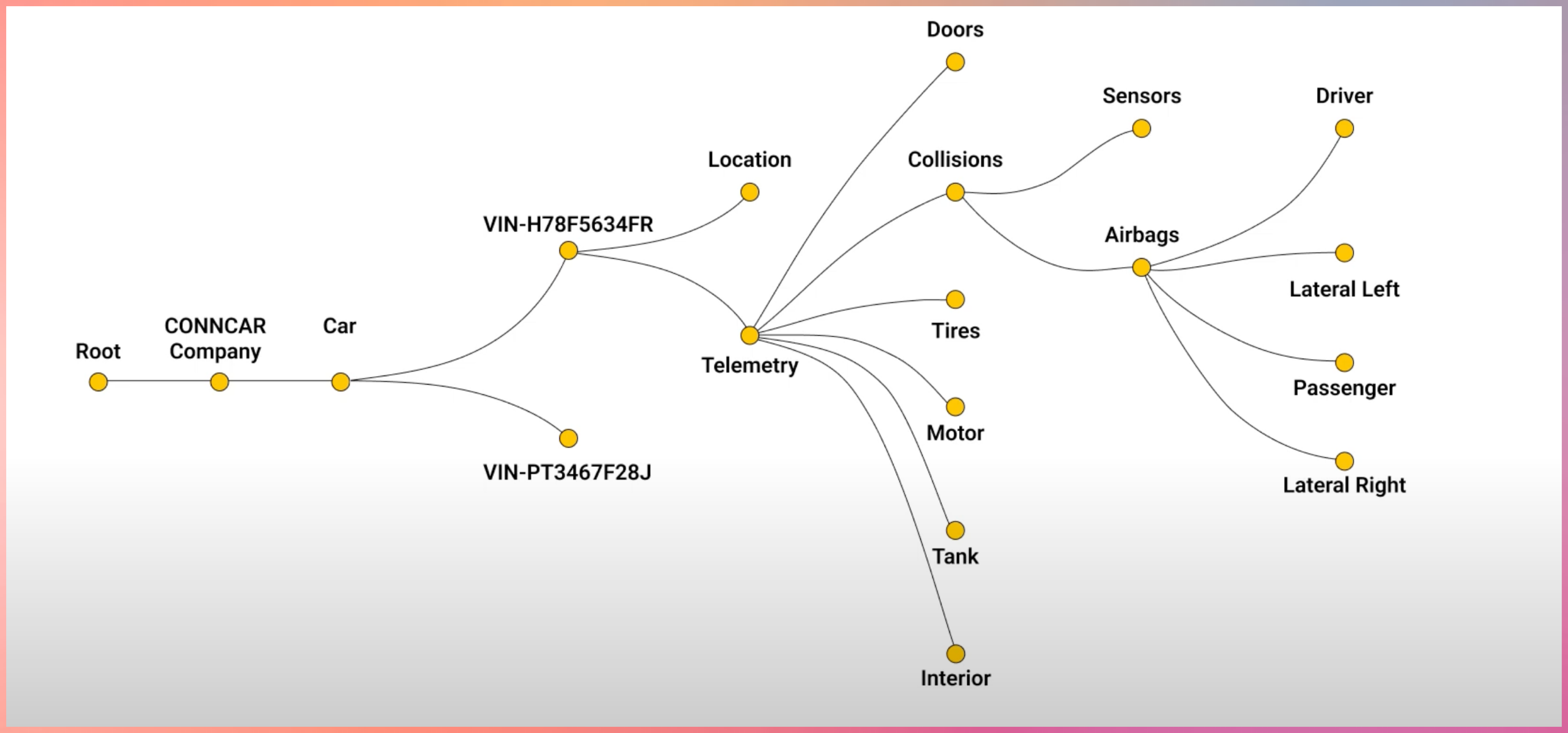
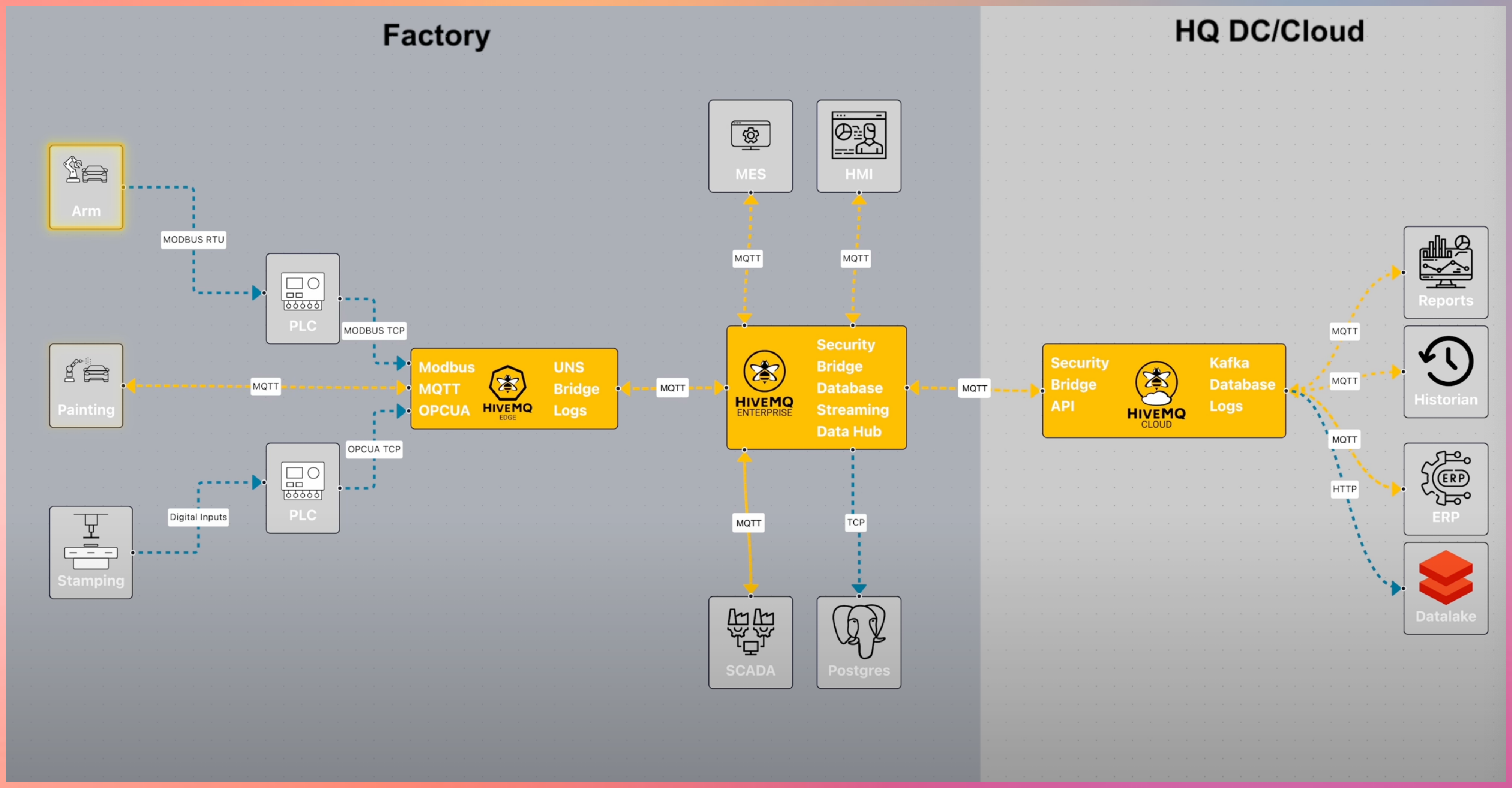
MQTT doesn’t stop here
MQTT integrates with:
- Cloud platforms
- Data pipelines
- Streaming systems
- Analytics and monitoring tools
Source YouTube Links
(https://www.youtube.com/watch?v=brUsw_H9Gq8)
(https://www.youtube.com/watch?v=k103_LhF05w)
Advanced Learning about Brokers
https://www.hivemq.com/blog/mqtt-brokers-beginners-guide/
Download the Open Source Broker to learn more https://mosquitto.org/
#mqtt #http #broker #publisher #subscriber
1: http://hivemq.com