[Avg. reading time: 8 minutes]
Number Systems
Binary
0 and 1
Octal
0-7
Decimal
Standard Number system.
Hex
0 to 9 and A to F
Base36
A-Z & 0-9
Great for generating short uniqut IDs. Packs more information into fewer characters.
An epoch time stamp 1602374487561 (14 characters long) will be converted to 8 character long Base36 string “kg4cebk9”
Popular Use Cases:
Base 36 is used for Dell Express Service Codes and many other applications which have a need to minimize human error.
Example : Processing 1 billion rows each hour for a day
Billion rows x 14 = 14 billion bytes = 14 GB x 24 hrs = 336 GB Billion rows x 8 = 8 billion bytes = 8 GB x 24 hrs = 192 GB
pip install base36
import base36
base36.dumps(1602374487561)
base36.loads('kg4cebk9') == 1602374487561
Base 64:
Base64 encoding schemes are commonly used when there is a need to encode binary data that needs be stored and transferred over media that are designed to deal with textual data. This is to ensure that the data remains intact without modification during transport.
Base64 is a way to encode binary data into an ASCII character set known to pretty much every computer system, in order to transmit the data without loss or modification of the contents itself.
2 power 6 = 64
So Base64 Binary values are six bits not 8 bits.
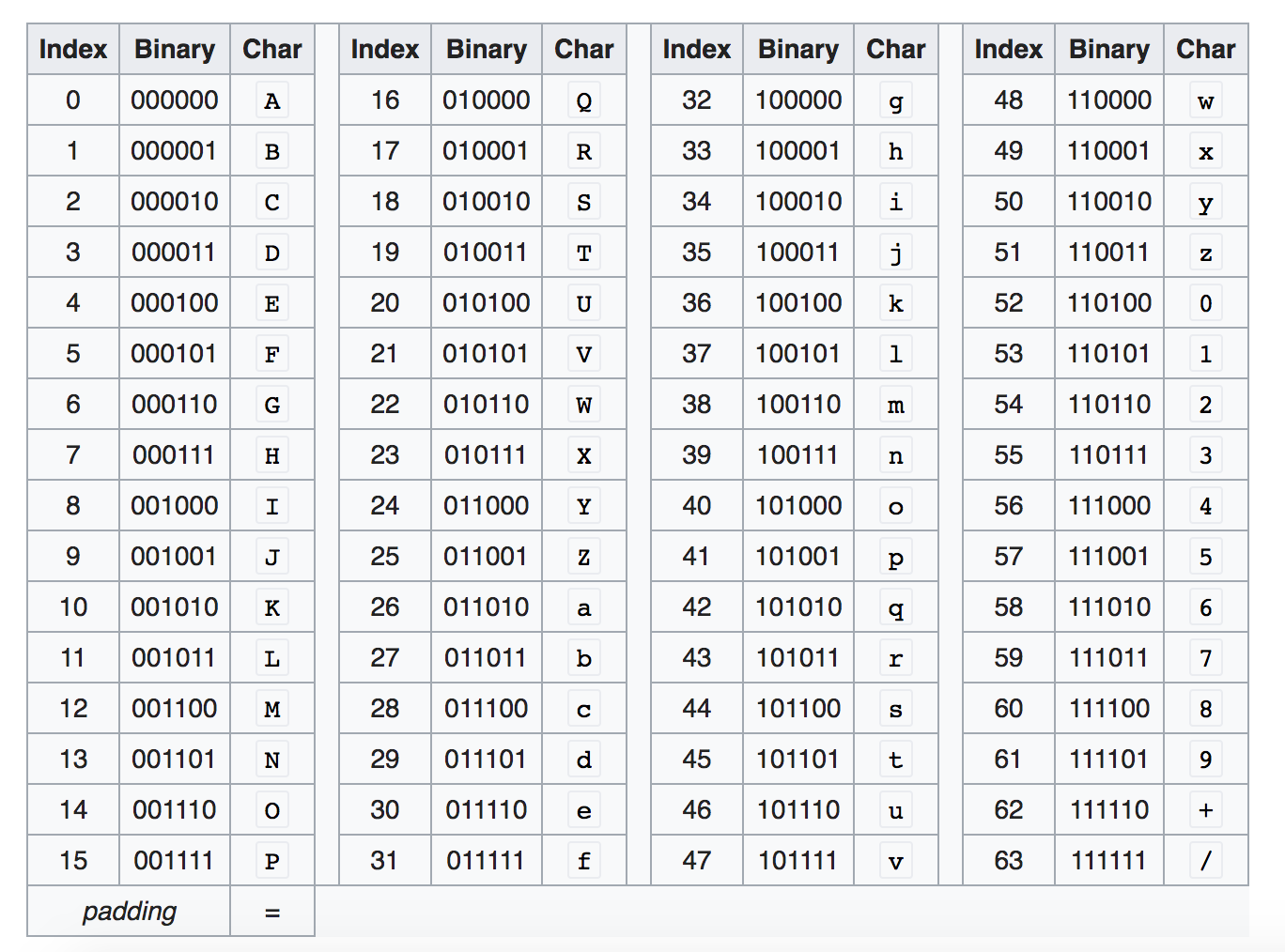
Base64 encoding converts every three bytes of data (three bytes is 3*8=24 bits) into four base64 characters.
Example:
Convert Hi! to Base64
Character - Ascii - Binary
H= 72 = 01001000
i = 105 = 01101001
! = 33 = 00100001
Hi! = 01001000 01101001 00100001
010010 000110 100100 100001 = S G k h
https://www.base64encode.org/
How about converting Hi to Base64
010010 000110 1001
Add zeros in the end so its 6 characters long
010010 000110 100100
Base 64 is SGk=
= is the padding character so the result is always multiple of 4.
Another Example
convert f to Base64
102 = 01100110
011001 100000
Zg==
Think about sending Image (binary) as JSON, binary wont work. But sending as Base64 works the best.
Image to Base64
https://elmah.io/tools/base64-image-encoder/
View Base64 online
https://html.onlineviewer.net/